Cornucopia App
UX design of a mobile donation app using value-sensitive design methods.
Project Overview
My Role
I led all UX design work as the sole designer on a five-person team:
Conducted stakeholder research and synthesized insights into design decisions
Developed user flows, wireframes, and interactive prototypes
Conducted usability testing and iterated based on feedback
Coordinated with four developers to maintain design vision through launch
Timeline & Context
Duration: 9 weeks (October–December 2025)
Course: CSE 403: Software Engineering at the University of Washington
Goal: Build a real software system while gaining hands-on experience in collaborative development
Team
Azita Balsara, UX Designer and PM
Andras Marto, Frontend Developer
Charles Bither, Full Stack Developer
Eli Joshi, Frontend Developer
Spencer Johnson, Backend Developer
Introduction
Problem
When someone wants to help their community through donation, they face an invisible barrier: uncertainty.
Charities urgently need specific items—winter coats in November, baby formula during shortages, fresh produce after community events—but potential donors have no way to know what those needs are in real-time.
The current system forces donors to:
Visit multiple charity websites (often with outdated wish lists)
Call during limited business hours
Guess what might actually be useful
The result:
Well-intentioned donations go unused
Urgent needs remain unmet
Donors lose trust and give less often
Our Solution
Cornucopia connects community members with local charities by making donation needs visible, actionable, and easily browsable.
Donors can discover local charities, browse their needs, and see clear scheduling options for drop-offs.
Charity organizations can post urgent needs, track upcoming donations, and mark donations as received.
Why It Matters
Charitable giving depends on:
Transparency — Donors need to see what's actually needed, not guess
Efficiency — Both sides need coordination without endless phone calls and confusion
Trust — Donors need to know their contribution made a difference, encouraging them to give again
When this connection breaks down, people lose confidence in giving and communities lose the ability to help each other effectively.
Research
Tripartite Methodology
To ground my design decisions, I used the Value Sensitive Design Tripartite Methodology, focusing on how people actually experience donation systems and identifying the values at stake. Here's how I used each investigation type:
Conceptual Investigation - Identified the individuals and groups that could be impacted by our design, and their associated values.
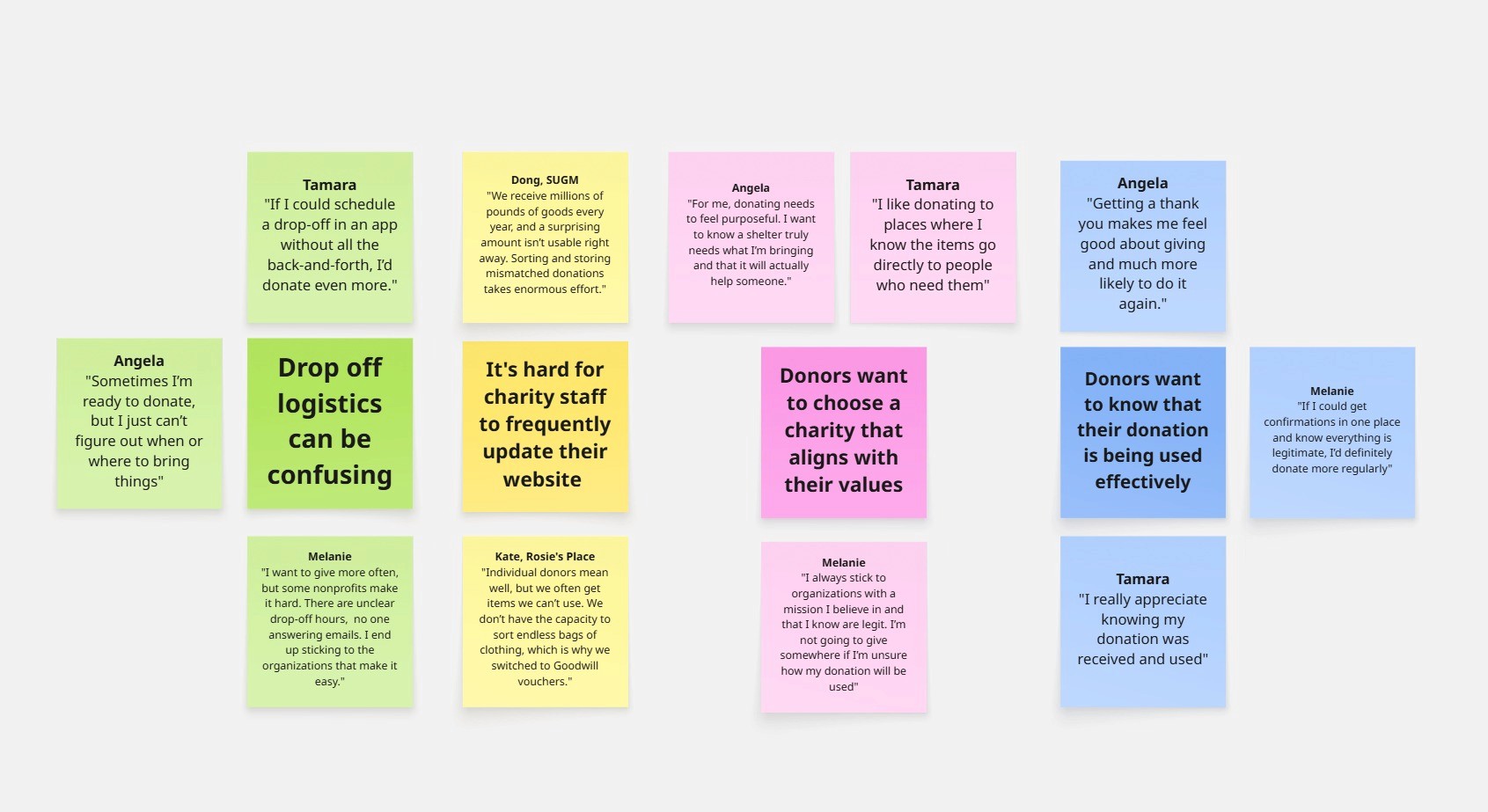
Empirical Investigation - Conducted semi-structured interviews with 3 donors and 2 charity staff members to explore donation experiences, motivations, and underlying values. Used affinity mapping to synthesize insights.
Technical Investigation - Performed competitive analysis to evaluate how existing charity platforms support or hinder stakeholder values. Used these insights to inform my initial wireframes.
Stakeholders & Values
To ensure the design served everyone impacted by charitable donation, I identified key stakeholder groups and the values that drive their participation:
Donors value:
Autonomy — choosing what and when to give
Trust — knowing their donation matters
Connection — feeling part of their community's support network
Charity organizations and staff value:
Efficiency — reducing coordination overhead
Dignity — presenting needs without desperation
Accountability — tracking and acknowledging contributions
Charity beneficiaries value:
Dignity — receiving what they actually need, not just what's available
Privacy — not being directly exposed in the donation process
The broader community values:
Social cohesion — neighbors helping neighbors
Resource stewardship — reducing waste from unwanted donations
Equity — ensuring resources reach those most in need
By centering these values, the design could create meaningful impact across the entire donation ecosystem—not just functional solutions.
Affinity Map
I Synthesized patterns from 5 stakeholder interviews revealing shared values and pain points across donor and charity experiences.
Design Process
Feature Mapping
I used my research insights to inform our app design. Each feature directly responded to pain points from interviews.
The process: I identified what frustrated each stakeholder, connected those frustrations to their core values, then designed features that addressed both the practical problem and the underlying value need.
Design principle: Every feature had to serve both stakeholders. If it solved a problem for donors but created work for charities—or viceversa—it didn't make the cut.
Insight
Feature
Donors like Melanie, Tamara, and Angela prioritized supporting trusted organizations with clear missions over convenience or decluttering. This revealed their need for autonomy.
Charity-first browsing—donors select causes they trust, then view those organizations' specific needs
Every donor cited coordination confusion as their main barrier to giving more often. This revealed their need for efficiency.
Appointment scheduling with clear time slots and instructions—eliminates phone tag and guesswork
Donors wanted to know their contributions were received and useful. Without this accountability, they lost confidence and gave less often. This revealed their need for trust.
Donation tracking with confirmations—donors receive acknowledgment that their contribution arrived and mattered
Charities need to communicate what they actually need in real-time, not manage outdated wish lists. This revealed their need for transparency and control.
Real-time needs posting/editing—staff update priorities instantly as needs shift
Coordination overhead consumed time better spent serving people. Charities needed tools that didn't add to their workload. This revealed their need for efficiency and accountability.
Recurring availability settings (set once, automatically generates slots) + One step donation confirmations
User Flows
With features mapped to stakeholder values, I designed complete flows showing how donors and charity staff would move through the system. Each step addresses specific pain points identified in research.
Donor Flow
Browse Charities — Explore organizations by cause and mission to find trusted charities
View Needs — See real-time list of specific items the charity currently needs
Schedule Drop-off — Book a convenient appointment slot with clear instructions
Drop Off — Bring donation during scheduled time
Receive Confirmation — Get acknowledgment that donation was received
Charity Flow
Set Availability — Define recurring drop-off hours once
Post Needs — Add, update, or remove needed items instantly
View Upcoming Appointments — See scheduled donations and donor details
Receive Donation — Accept items during the appointment
Mark Received — Confirm donation with one tap, automatically notifying donor
Testing Reality Against Assumptions
To validate whether these flows actually worked, I created wireframes and tested them with potential users, using the Cognitive Walkthrough testing method. Testing revealed friction points that needed addressing.
For Example: The initial charity details page was disorganized and lacked key information.
Usability Testing Feedback:
"I just want to see what they need. Why do I have to scroll past all this?"
"Wait, where do I see when I can drop things off?"
"There's so much information here—I can't find what I'm looking for."
"How do I actually donate? I don't see a clear next step."
Donors needed a more efficient way to evaluate the charity, find relevant information and take action. Based on this feedback, I redesigned the charity details page to respect donor time by organizing information clearly.
Initial Design
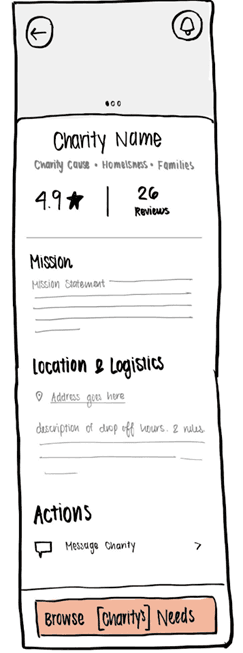
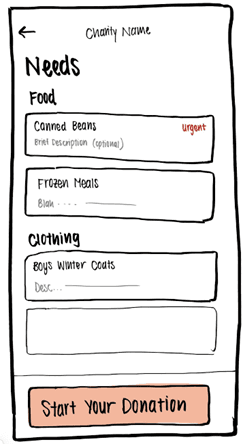
My first version crammed everything onto one scrolling page. Donors had to scroll through it all to find what they needed, with no clear way to check drop-off times, or even start a donation.
Redesign
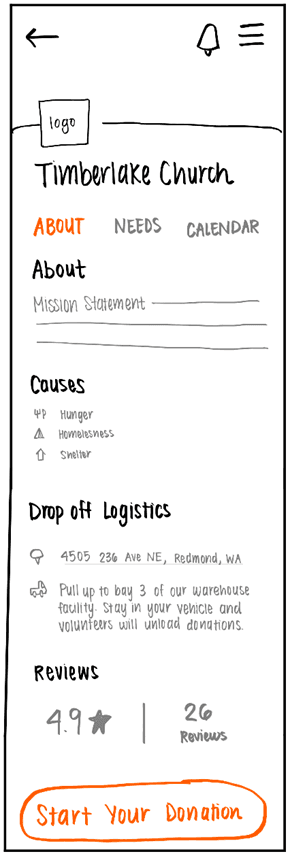
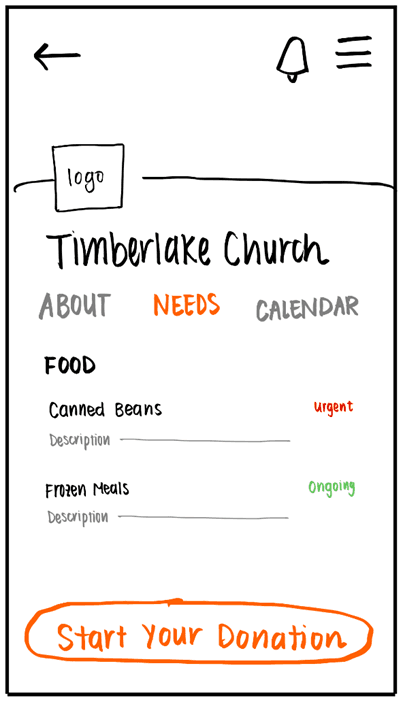
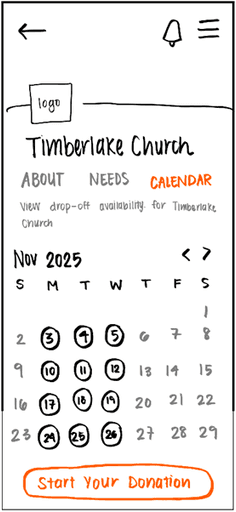
I redesigned the profile with three tabs—About, Needs, and Calendar—so donors could go straight to the information they wanted. I added a clear "Start Your Donation" button that stays visible across all tabs, and a notifications bell so donors control their alerts.
Prototyping for Speed and Clarity
Rather than investing time in high-fidelity mockups, I used Marvel to add hotspots to my wireframes, creating an interactive prototype that validated flows rapidly. This allowed me to validate flows quickly.
Why low fidelity? Evidence shows that low-fidelity prototypes lead to faster iteration and better feedback. This approach kept me centered on information architecture and core interactions without visual details slowing down progress.
The prototype with detailed developer notes became our single source of truth. When questions arose—"How should this transition work?" "What happens if a donor cancels?"—the team could click through the intended experience and consult specifications.
This approach kept us moving quickly while ensuring the final product honored the core values of transparency, efficiency, and accountability.
You can check-out my prototypes here!
Solution
Here are some key screens from the final design, showing how donors and charity staff move through the platform
Disclaimer: We are in the process of finalizing our app screens. I will add them here after our app release, on December 2nd, 2025.
Reflection
Limitations
Limited research depth
Our 9-week timeline constrained stakeholder engagement to only 5 interviews and informal usability testing. More extensive input would have ensured I was designing with stakeholders, not just for them—a core principle of Value-Sensitive Design.
Untested in real-world contexts
We couldn't recruit beta testers or launch the app to actual users. Real-world usage would reveal whether our solutions truly support the intended values in practice and surface edge cases that controlled testing couldn't predict.
Takeaways
1. Challenge Assumptions Early
My initial instinct was to match donors to needs algorithmically. However, my research revealed donors care more about who they are donating to then the specific items they are donating. This taught me to test assumptions with real stakeholders before investing in solutions, even when they seem logical.
2. Friction Points Are Design Opportunities
Drop-off scheduling seemed like a "nice-to-have" until every single donor mentioned logistics as their primary barrier. The most impactful features often hide in the frustrations people have normalized, so listening for pain points reveals where design can make the biggest difference.
3. Design for Constraints, Not Ideals
Charity staff don't have time for constant platform updates. Designing the drop-off availability system to require minimal input—while still providing real-time coordination—taught me that the best solutions work within stakeholder realities, and understanding operational constraints is as important as understanding user goals.
4. Values Provide Clarity in Complexity
When facing competing stakeholder needs, returning to core values like transparency, autonomy, and efficiency provided a framework for making defensible trade-offs. Values became a North Star when priorities conflicted.